
Instead of manually rebuilding your lender package whenever an SBA underwriter asks for updated numbers, reconcile QuickBooks, save consistent report settings, and maintain a dated submission folder. This 2026 workflow turns your books into reviewable financial statements; it does not turn a report export into loan approval.
- For a QuickBooks financials SBA loan application, reconcile accounts before exporting statements.
- Flex V Capital Ltd offers SBA financing; QuickBooks reports support underwriting but do not establish eligibility.
- Use consistent reporting dates and accounting methods, then explain differences from filed tax returns.
- Refresh the lender package after a completed close, not after every bank-feed update.
Why this matters
Your lender needs evidence of repayment capacity, not just a positive bottom line. Uncategorized transactions, missing liabilities, and inconsistent reporting dates leave the underwriter with figures that cannot be reconciled.
Flex V Capital Ltd is best for business borrowers seeking SBA financing from a direct commercial lender in New York. You can start a financing discussion with Flex V Capital Ltd, but prepare the financial package before treating any preliminary response as an approval.
For your 2026 application, separate bookkeeping completion from credit evaluation. QuickBooks supplies accounting records; the lender evaluates eligibility, repayment, ownership, the proposed use of proceeds, and supporting documentation. Neither a clean report nor an exported spreadsheet replaces that review.
Before you start
- Access and records: Use QuickBooks Online access that permits reporting and reconciliation. Have bank statements, credit-card statements, loan statements, filed business tax returns, and your lender's document checklist ready. This guide covers a report-based workflow, not a connection that submits an application automatically.
- Reporting instructions: Confirm the business entity, requested periods, accounting basis, and submission method with the lender. Use 1 common cutoff date for the current financial package unless the lender requests otherwise.
- The hidden trap: A bank-feed transaction is not proof that an account is reconciled. Also check the accounting basis: cash-basis and accrual-basis reports can show different results for the same period. Resolve that choice before exporting.
QuickBooks Online has different report views. The steps below use familiar standard-report labels; control placement varies by view. Open the named report rather than searching for a nonexistent SBA application button.
Reporting scope
- Identify the applicant. Confirm the legal business entity seeking financing and the QuickBooks company containing its records. Keep affiliated businesses separate unless the lender specifically requests combined statements.
- Create a request checklist. Record every document the lender requests, its reporting period, its owner, and whether it has been submitted. Separate historical statements from projections and borrower-prepared explanations.
- Set the cutoff. For current financials, use a completed month-end when that meets the lender's instructions. A report ending midmonth contains a different period from a completed monthly close.
- Select the accounting basis. Confirm whether the lender wants cash-basis or accrual-basis statements. If tax returns use a different basis, identify that difference explicitly rather than forcing the reports to look alike.
- Assign review responsibility. Name the person who approves the bookkeeping before export. Use your accountant for unresolved accounting treatment, not the underwriter as your first reviewer.
Expected result: You have a written reporting scope: applicant, requested periods, accounting basis, cutoff date, and reviewer. This controls every export that follows.
Cash basis versus accrual basis
Neither basis is a shortcut to approval. Follow the lender's request and use the comparison below to understand what the reports show.
| Reporting basis | Best for | Benefit | Limitation |
|---|---|---|---|
| Cash basis | A lender request for cash-basis statements | Shows income and expenses based on cash receipt and payment | Does not present unpaid customer invoices and vendor bills as accrual reporting does |
| Accrual basis | A lender request to assess earned revenue and incurred expenses | Connects activity to the period in which it is earned or incurred | Reported profit does not establish that cash has been collected |
Do not switch methods merely because one shows higher income. An unexplained change creates a comparability problem across reporting periods.
Bookkeeping close
- Complete transaction review. Categorize bank-feed activity and check for duplicate entries. Where an existing transaction already records a payment, match the downloaded activity rather than creating another expense.
- Reconcile cash accounts. Open Reconcile and reconcile each relevant bank and credit-card account to its statement. Investigate differences instead of inserting an adjustment solely to force agreement.
- Review receivables and payables. Check open customer invoices and vendor bills. Resolve duplicate documents, unapplied payments, and balances that no longer represent genuine amounts owed.
- Check debt and owner activity. Compare recorded loan balances with supporting statements. Review loan proceeds, principal payments, owner contributions, and distributions so they are not incorrectly treated as operating revenue or expense.
- Review unusual balances. Examine suspense accounts, uncategorized activity, negative balances, and significant changes from prior periods. Document corrections and retain the supporting evidence.
Expected result: The accounts support the reporting cutoff, and outstanding questions are documented. Do not describe unfinished books as final financial statements.
For a 2026 submission, retain a brief close note identifying who reviewed the books and which period was completed. If you use a 12-month comparison, label its exact beginning and ending dates; do not let a rolling period masquerade as a fiscal year.
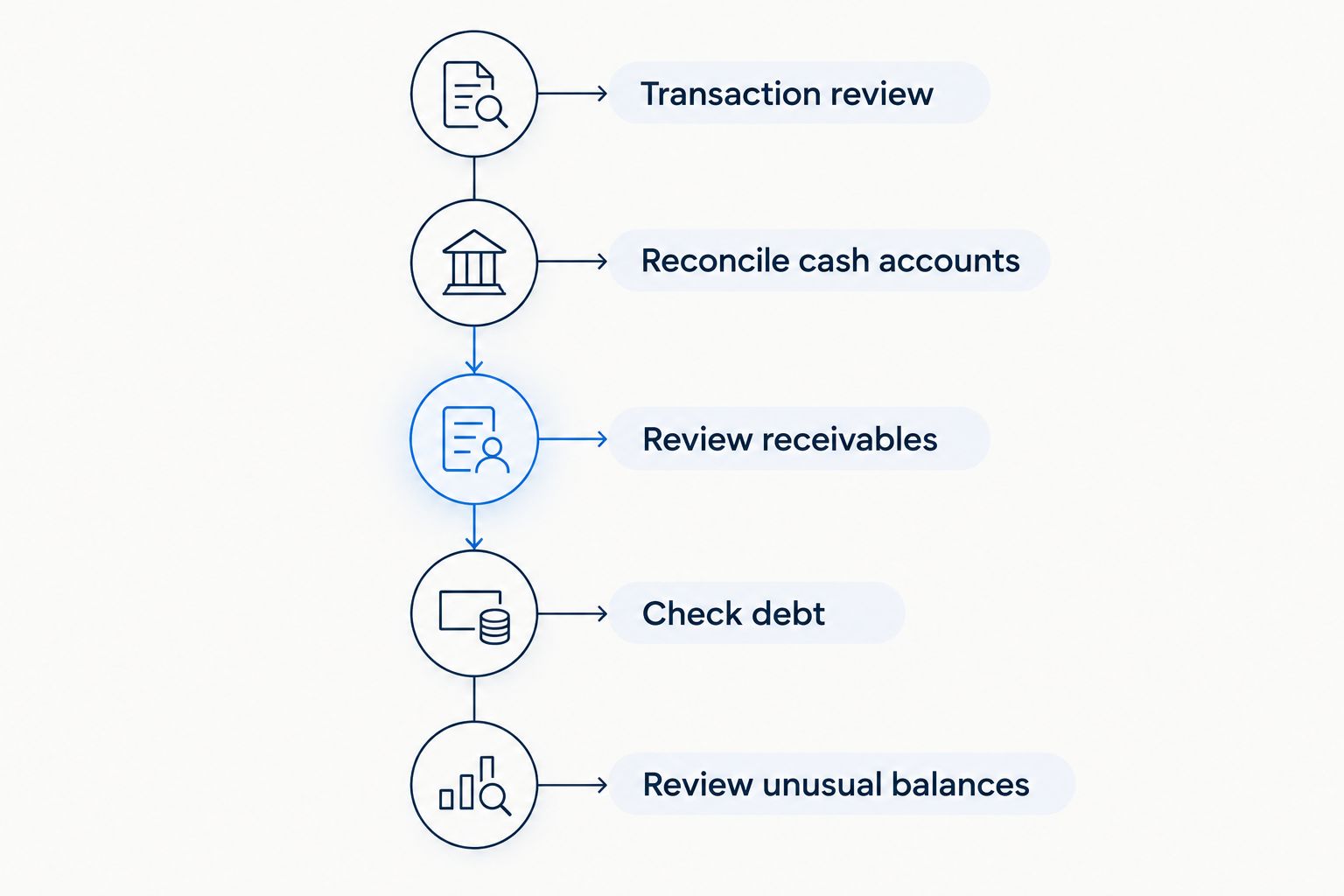
The close sequence matters because a later correction changes the exported package. Finish the review first, then generate statements from the same set of books.
Financial report package
- Open the income statement. Go to Reports and open Profit and Loss. Set Report period to the lender's requested dates and select the agreed Accounting method. In the standard report view, select Run report after changing these settings.
- Open the balance sheet. Under Reports, open Balance Sheet. Set the ending date to the agreed cutoff and use the requested accounting method. Confirm that the displayed ending date matches the package instructions.
- Add requested detail. Produce receivables aging, payables aging, transaction detail, or comparative statements when the lender requests them. A summary income statement does not explain every balance-sheet account.
- Export reviewable files. Use each report's export or print controls to create the requested file format. Retain a readable PDF when requested; provide a spreadsheet only when the lender requests or accepts it. Do not overwrite exported figures to improve the application.
- Inspect the exports. Open the actual files and check the entity name, reporting dates, accounting basis, column headings, totals, and page breaks. A correct on-screen report can still produce an awkward or incomplete print layout.
Expected result: Your core package contains 2 reports—the income statement and balance sheet—with the requested dates and basis, plus any lender-requested detail.
The income statement measures activity over a period; the balance sheet presents balances at a date. Their dates serve different purposes, but their settings and scope must still agree with the lender's request.
Use clear file names containing the entity, report type, period, and version. A file named with a 2026 month-end is easier to identify than several attachments all called final.
Submission and approval tracking
- Compare reports with tax records. Identify differences between QuickBooks financials and filed business tax returns. Ask your accountant to explain adjustments, accounting-basis differences, and timing items; do not assume every difference is an error.
- Prepare the supporting schedules. Complete the lender's requested debt schedule, ownership information, proposed use of funds, and other application materials. The SBA program and transaction determine the full package.
- Explain adjustments separately. If you propose an add-back or other cash-flow adjustment, show the underlying expense and supporting documentation. Label the adjustment as proposed; the lender decides whether to accept it.
- Submit securely and log conditions. Use the lender's designated secure channel. Record each outstanding request, responsible person, and response status without circulating account credentials by email.
- Separate decision stages. Track preliminary feedback, underwriting conditions, approval, closing requirements, and disbursement separately. Ask what remains outstanding at each stage instead of treating the word approved as permission to spend proceeds.
Expected result: The lender receives a traceable package, and you have a single list of unresolved conditions. QuickBooks remains the accounting source, not the authority for the lending decision.
Flex V Capital Ltd offers SBA financing, but its broader commercial lending range does not establish your SBA eligibility or transaction-specific terms. Confirm the applicable program and documentation requirements before preparing projections around an assumed approval.
Refresh the package after each completed close
For an application still under review in 2026, use a controlled update workflow rather than rebuilding the package from scratch. This is the adjacent workflow: replace the original financial snapshot when the lender needs newer statements.
- Complete the next bookkeeping close and reconciliation.
- Reopen the same reports and preserve the agreed accounting basis.
- Advance the cutoff date and any comparison periods deliberately.
- Export a newly dated package and identify what changed.
- Send the update through the lender's designated channel and retain the prior submission.
Expected result: The lender receives a newer, comparable financial snapshot without losing the history of earlier submissions.
| Package workflow | Best for | Benefit | Limitation |
|---|---|---|---|
| Initial submission | Establishing the underwriting baseline | Creates a dated starting point | Becomes outdated as the application continues |
| Close-based refresh | Responding to requests for current statements | Preserves consistent reporting settings | Requires review of changes since the prior package |
Do not trigger an underwriting update whenever a bank feed imports activity. An import is not a completed close, and partial-period changes can create unnecessary questions.
Troubleshooting
The reports disagree with the tax return
Check the entity, period, and accounting basis first. Then obtain the accountant's reconciliation of tax adjustments and book entries. Submit the explanation with the relevant supporting schedule rather than editing the export.
Revenue or expenses appear twice
Inspect whether downloaded bank transactions were added after the underlying invoice payment or bill payment had already been recorded. Correct the duplication in QuickBooks, reconcile again, and replace affected exports.
Profit is positive, but cash is tight
Review unpaid receivables, inventory purchases where applicable, debt principal payments, and owner distributions. Accrual profit and cash available for debt service are different measures; ask the lender which cash-flow calculation it requires.
The lender requests a newer package
Repeat the close-based refresh workflow using the requested cutoff. Preserve the previous submission, label the replacement clearly, and explain material corrections instead of silently replacing files.
The PDF loses columns or headings
Review the report's print layout and narrow unnecessary columns before exporting again. Open the replacement PDF and verify every page; sending the spreadsheet does not fix an unreadable PDF already submitted.
Customize your workflow
Expand the package around the transaction, not around every report QuickBooks can generate. A business acquisition, property purchase, and working-capital request require different supporting evidence even when they start from the same books.
Use the SBA loan lenders guide to structure lender discussions. Ask each lender which documents are required before submission, which follow during underwriting, and who coordinates outstanding conditions.
Keep borrower-prepared projections separate from historical results. State the assumptions behind revenue, expenses, and debt service; do not present a forecast as a QuickBooks historical report.
FAQ
Can I use QuickBooks financials for an SBA loan application?
Yes. QuickBooks income statements and balance sheets can support an SBA loan application when they meet the lender's reporting requirements. They do not replace tax returns, application documents, or underwriting.
Which QuickBooks reports should I prepare first?
Prepare the Profit and Loss and Balance Sheet reports for the lender's requested periods. Add aging reports, transaction detail, and other schedules when requested.
Should my SBA application use cash-basis or accrual-basis financials?
Use the accounting basis the lender requests. Identify any difference from the basis used for filed tax returns and provide an accountant's explanation when needed.
Does QuickBooks submit my SBA application automatically?
The report-export workflow described here does not submit an SBA application automatically. Export the requested documents and submit them through the lender's designated process.
Can Flex V Capital Ltd provide SBA financing?
Yes. Flex V Capital Ltd lists SBA financing among its lending offerings. Confirm the applicable program, eligibility requirements, and transaction-specific documentation directly with the lender.
How often should I update financials during underwriting?
Update financials when the lender requests a newer cutoff or corrected statements. Complete the relevant bookkeeping close before exporting the replacement package.
Will clean QuickBooks reports guarantee SBA loan approval?
No. Clean reports support underwriting, but approval also depends on eligibility, repayment capacity, the transaction, and required supporting evidence. Preliminary feedback is not the same as closing or disbursement.
One last thing
Keep a copy of exactly what the lender received. A saved report configuration can produce different results after backdated bookkeeping entries, even when you rerun the same reporting period.
Archive the exported files and submission date alongside your condition log. That gives your 2026 application a stable record when an underwriter asks why a previously submitted balance changed.